
Install
Download one ZIP, extract it, open the launcher for your computer and click Install. On Windows it sets up everything it needs by itself.
#Download
Download the ZIP. The link always gives you the newest version.
The green Code button on GitHub gives you the source code, not the app. It will not install.
#Install on Windows
- Extract the ZIPRight-click the downloaded file and choose Extract All…, then Extract. Put it somewhere you will remember, such as
Documents. - Open the launcherIn the new folder, double-click Free GST Billing - WINDOWS. Each launcher is named after the computer it is for.
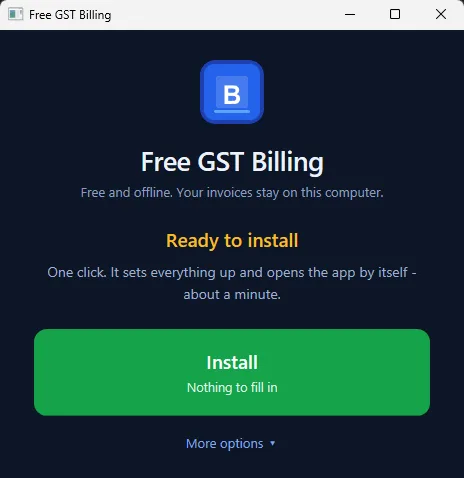
- Click InstallA small window opens with one button. Click Install. There is nothing to fill in.
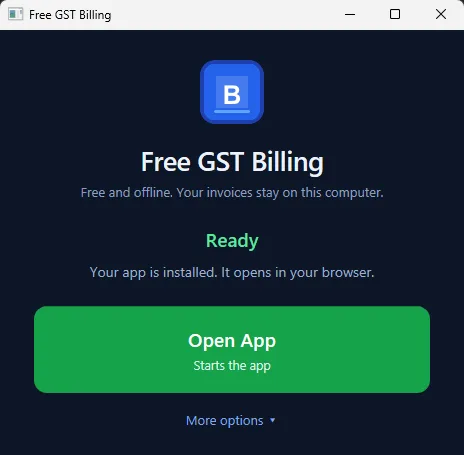
- Wait for the browserA black window does the work and closes by itself. It takes one to three minutes the first time. The app then opens in your browser at
http://localhost:47371.
#Extract the ZIP before opening anything
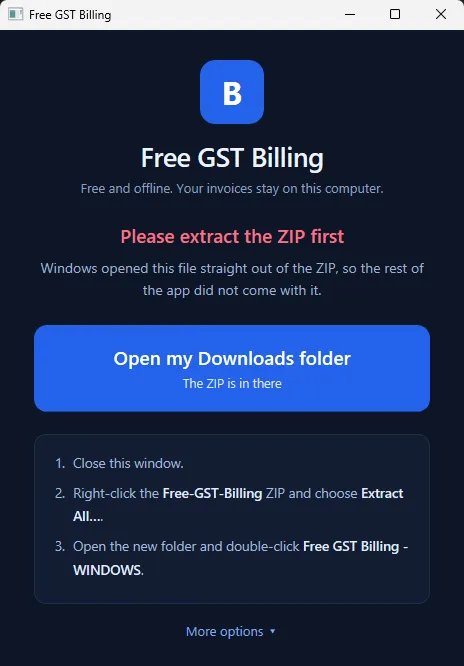
Windows lets you double-click a file while you are still looking inside a ZIP. When you do, it copies just that one file to a temporary folder and runs it there, so the rest of the app is not next to it.
The launcher notices this and says Please extract the ZIP first, with a button that opens your Downloads folder. Close it, extract the ZIP, and open the launcher from the extracted folder.
#"Windows protected your PC"
You may see this blue warning the first time. It appears for software that is not signed with a paid certificate, which costs a few hundred dollars a year and would make a free app not free.
- Click More info.
- Click Run anyway.
If the file will not open at all, right-click Free GST Billing - WINDOWS, choose Properties, tick Unblock at the bottom, and click OK.
If your antivirus removes a file during install, add the app's folder to its exclusions and click Install again.
#What the installer does
- Sets up Node.js inside the app folder, if your PC does not already have it. Node.js is the engine the app runs on. It is downloaded once (about 30 MB) from nodejs.org and kept in
_system\node. Nothing is installed into Windows, and no administrator rights are needed. - Downloads the app's building blocks from the internet. This is the only other download.
- Puts a Free GST Billing shortcut on your Desktop and in the Start menu, with the app's icon.
- Opens the app in your browser when it is done.
If you already have Node.js, the installer uses yours and leaves it alone.
#Install with one command (optional)
If you are comfortable with a terminal, this does all of the above. Open PowerShell and paste:
irm https://raw.githubusercontent.com/IamRamgarhia/Free-GST-Billing-Software/main/install.ps1 | iexIt installs to %LOCALAPPDATA%\Programs\Free GST Billing. To choose another folder, run this first:
$env:FREEGSTBILL_DIR = 'D:\Apps\Free GST Billing'If the app is already installed in that folder with data in it, the command stops and tells you to update from inside the app instead, so it can never write over your books.
#Install on a Mac
On a Mac, Node.js has to be installed first. It is free.
- Install Node.jsDownload the installer from nodejs.org, or if you use Homebrew, run
brew install node@20. - Extract the ZIPDouble-click the downloaded ZIP. macOS extracts it next to the download.
- Open the launcherIn the folder, open Free GST Billing - MAC. If macOS says it is from an unidentified developer, right-click it, choose Open, then Open again.
- Let it finishA Terminal window sets the app up the first time, then opens it in your browser.
#Install on Linux or a NAS
As on a Mac, install Node.js 18 or newer first, for example sudo apt install nodejs npm. Then:
unzip Free-GST-Billing.zip
cd Free-GST-Billing
chmod +x "Free GST Billing - LINUX.sh"
./"Free GST Billing - LINUX.sh"
The app then runs at http://localhost:47371. To update later from inside the app, the system also needs unzip or python3.
#The first time the app opens
A short welcome asks for your business details and bank or UPI, then offers to set up your invoices for your kind of business. See The first-run setup.
#Opening the app every day
Double-click the Free GST Billing shortcut on your Desktop, then Open App. The launcher is also where you update, back up, restore, and move to another PC, under More options.
It is the one file you need. You never have to download anything again to update; the launcher does it for you.
#Removing the app
Nothing is installed into Windows itself, so removing the app is just deleting it:
- Back up your data first if you might want it again. See Export everything to one file.
- In the launcher, open More options and click Stop the app.
- Delete the app's folder, and the Free GST Billing shortcuts on the Desktop and in the Start menu.